
Case Study: Why Vector Files Matter for Laser-Engraved Products
When customers order custom nameplates or custom products, the most common point of confusion isn’t color, size, pricing, or minimum quantities—it’s artwork format. Specifically, the difference between vector artwork and raster (non-vector) artwork.
This case study exists so we can clearly explain why vector files matter, what goes wrong when they’re missing, and how we help customers move forward without frustration or delays.
Because our nameplates are laser engraved at up to 1000 DPI, artwork quality directly affects edge sharpness, legibility, and overall professionalism.
A Real-World Scenario (What Usually Happens)
A customer submits artwork labeled as one or more of the following:
- EPS
- PNG
- JPG
On screen, the file looks perfectly fine. Naturally, the question comes next:
“Why won’t this work? It looks sharp to me.”
The issue isn’t how the file looks—it’s how the laser reads it.
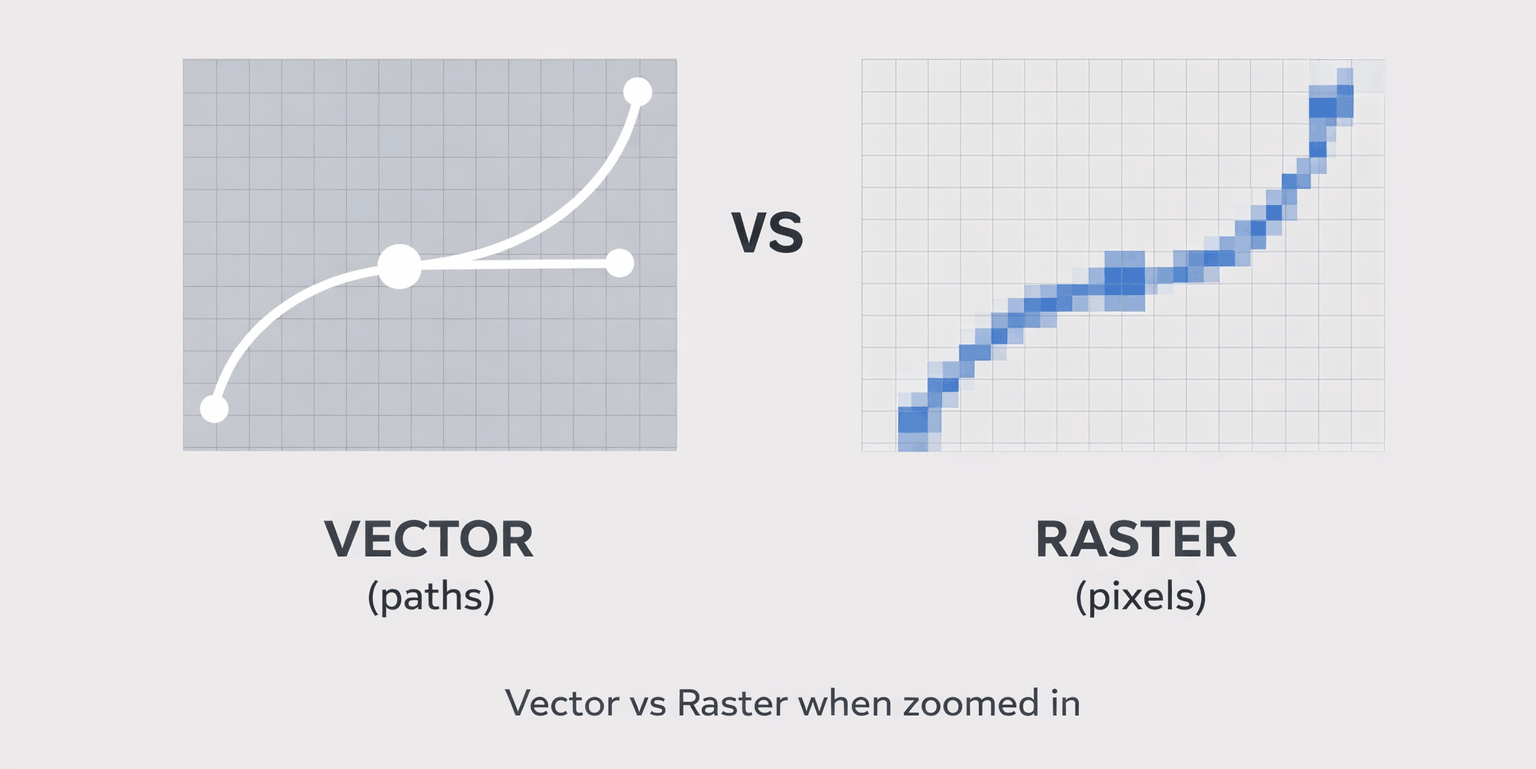
Vector vs. Raster (Non-Vector): The Practical Difference
Vector Artwork (Required for Laser Engraving)
Vector files are built from mathematical paths, not pixels. That means:
- Lines remain perfectly sharp at any size
- Text and logos engrave with crisp, clean edges
- No degradation when scaling up or down
- Predictable, repeatable results across production runs
Accepted vector formats include:
- Adobe Illustrator (.AI)
- Encapsulated PostScript (.EPS)
- Scalable Vector Graphics (.SVG)
- Vector-based PDF files
Raster (Non-Vector) Artwork
Raster artwork is pixel-based. Common examples include:
- JPG
- PNG
- GIF
- TIFF
- PSD (Photoshop files)
These formats are designed for screens and photographs—not precision manufacturing. When used for laser engraving, raster artwork often results in:
- Soft or jagged edges
- Inconsistent line weights
- Reduced clarity at engraving resolution
Raster files are excellent reference images, but they are not production-safe engraving files.
“But the PDF / EPS Looks Fine”
This is one of the most common misconceptions.
A PDF or EPS file can appear clean while still containing pixel-based artwork. If a PDF was created by exporting a JPG or PNG, the laser still sees pixels—not paths.
The result:
- Fuzzy or inconsistent engraving
- Unpredictable results from one plate to the next
- Delays while artwork is corrected or rebuilt
Vector vs. Production-Ready Vector
Even when artwork is technically vector, it may still not be production-ready.
Common issues we see:
- Fonts that are not outlined
- Missing or substituted fonts
- Linked or embedded raster elements
- Incorrect or outdated logo versions
For reliable engraving:
- All text should be converted to outlines
- All elements should be self-contained
- A reference image should be included to confirm intended appearance
What If You Don’t Have Vector Artwork?
This is extremely common—and it’s not a deal-breaker.
Option 1: Submit What You Have
You can send:
- Your logo (any format)
- Company name
- Contact details or other text
We can review what you have and advise on next steps.
Option 2: Professional Vector Conversion
If vector artwork is not available, we offer manual vector conversion and graphic design services at $100 per hour. This includes:
- Rebuilding logos as true vector paths (not auto-trace)
- Cleaning distorted or low-quality artwork
- Font matching and outlining
- Preparing files specifically for laser engraving
Can Raster Artwork Ever Work?
In limited cases, very high-resolution raster artwork may be usable at our discretion—typically for simple designs with minimal detail.
However:
- Results are not guaranteed
- Raster engraving is not repeatable
- Additional manual work is often required
For these reasons, vector artwork remains the required and recommended standard.
Dimensions: Why We Don’t Ask for Exact Sizes
Customers often ask for exact plate dimensions before designing artwork. That’s not necessary.
- Case inlay sizes vary by model
- We do not require dimension-specific artwork
- Our designers adapt vector assets to the appropriate plate size
General guidance:
- Wide logos work best (approximately 7:1 aspect ratio)
- Custom sizes are available
- Designs over 32 square inches require a custom quote
Color Expectations with Laser Engraving
Laser engraving is a single-color process:
- No gradients
- No full-color printing
- Final appearance is determined by surface color vs. substrate color
Backgrounds in vector files do not need to be transparent.
Submitting Files
Files and details can be sent to:
jason@jasoncases.com
We strongly recommend including:
- The vector source file (AI / EPS / SVG)
- A reference JPG or PNG showing the intended appearance
Final Takeaway
Laser engraving is a precision manufacturing process. To achieve clean, professional results, true vector artwork is essential.
This case study isn’t about making things difficult—it’s about ensuring your finished nameplates match the quality of the equipment they’re attached to.
If you have vector files, production moves quickly. If you don’t, we’ll help you choose the best path forward so your project stays on track.